
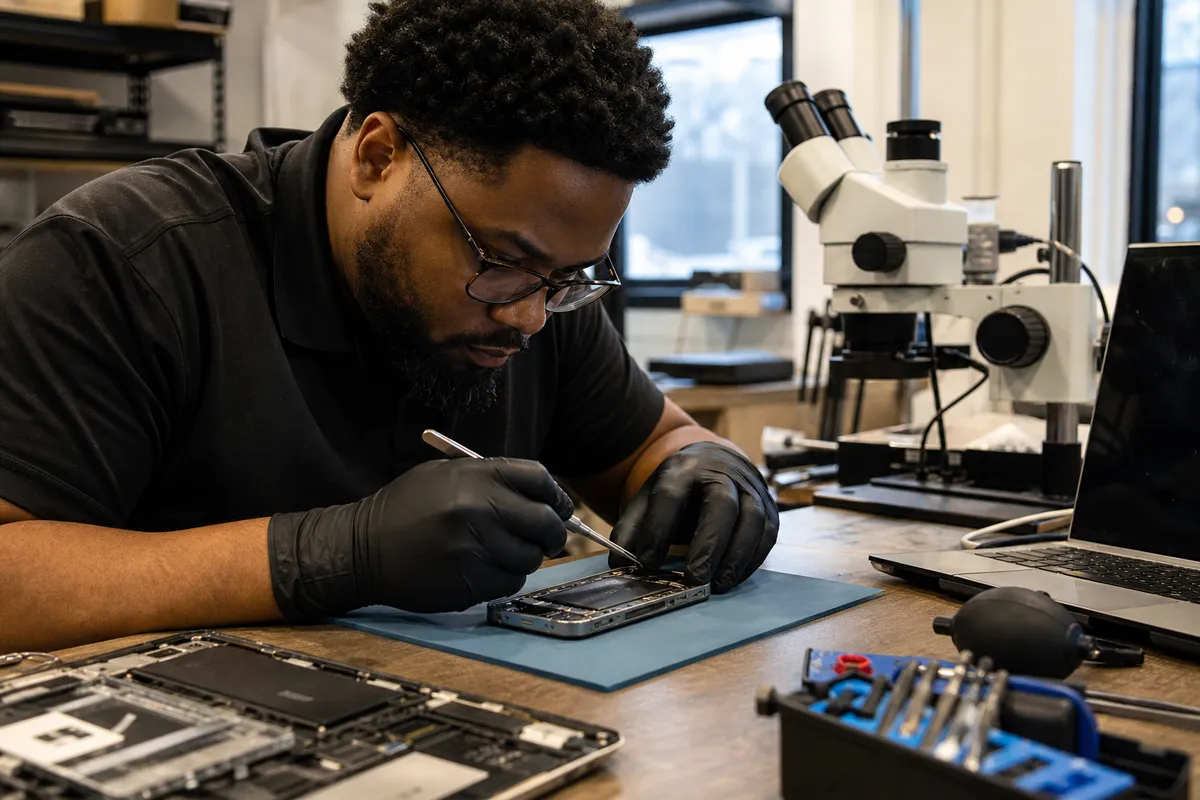
Emergency Liquid Damage Repair for Electronics Guide
Liquid exposure is one of the few electronics failures where the first minutes can change the outcome. A phone dropped in a sink, a laptop splashed with coffee, or a game console exposed to a leaking drink may still power on—and that is exactly why emergency liquid damage repair for electronics needs a disciplined response rather than guesswork. At Logitium in Robbinsdale, MN, the central principle is simple: stop electrical activity, limit contamination, document what happened, and get the device assessed before corrosion turns a localized spill into a board-level failure.
This guide explains what to do immediately, what not to do, why different liquids create different risks, and when professional diagnostics are the sensible next step. For more practical device-care guidance, explore the electronics care resource center.
Why Emergency Liquid Damage Repair for Electronics Is Time-Critical
Liquid damage is not a single event. It is a process. The initial spill can create an electrical short, but the damage often continues after the device has been wiped dry. Minerals, sugars, acids, salts, and other dissolved contaminants can remain on connectors, component leads, and circuit boards. In the presence of humidity and electrical potential, those residues can contribute to corrosion and leakage paths.
That is why effective emergency liquid damage repair for electronics is about more than drying the exterior. A device can look dry while moisture remains under shields, inside charging ports, beneath keyboard layers, around battery connectors, or under integrated circuits. Modern devices are densely assembled, and many use low-voltage circuits with extremely small contact spacing. A small residue bridge can be enough to cause charging problems, random restarts, display faults, or eventual no-power symptoms.
The highest-risk action after a spill is repeatedly trying to turn the device on “just to check.” Power can accelerate damage when moisture or contamination is present. A successful boot is not proof that the device is safe; it only means the failure has not become obvious yet.
The four damage mechanisms technicians look for
- Immediate shorts: Conductive liquid can connect points on a circuit that should remain isolated.
- Electrochemical corrosion: Residue and moisture can react with metals and degrade pads, traces, connectors, and component legs over time.
- Contamination: Sugary, acidic, salty, or oily liquids leave residue that air-drying does not remove.
- Secondary battery risk: A damaged or wet lithium-ion battery requires careful handling. Swelling, heat, odor, hissing, or smoke are safety concerns—not DIY repair tasks.
Emergency Liquid Damage Repair for Electronics: The First 10 Minutes
Use this sequence for phones, tablets, laptops, handheld gaming devices, headphones, consoles, and similar consumer electronics. The exact steps vary by device, but the priorities remain consistent.
1. Disconnect power immediately
Unplug the charging cable, dock, accessory, or power adapter. If the device is connected to a power strip, disconnect it safely at the source. Do not continue charging a wet device. For a laptop, remove external power first; do not press keys or attempt a normal shutdown sequence if it has been directly exposed and is still operating.
2. Turn it off—without testing it
If the device is on and can be powered down without manipulating many controls, shut it down. If it is already off, leave it off. Avoid the instinct to test the screen, speakers, cameras, charging function, or buttons. In emergency liquid damage repair for electronics, preventing additional current flow is often more valuable than diagnosing symptoms at home.
3. Remove accessible accessories
Remove cases, cables, SIM trays, memory cards, detachable keyboards, and removable batteries where the manufacturer designed them to be user-removable. Take off protective cases because they trap moisture against seams and ports. Do not pry open a sealed phone, tablet, modern laptop, or game console unless you have the right tools and technical experience; forcing entry can damage seals, cables, and displays.
4. Position the device to drain, not to spread
Gently orient the device so visible liquid can exit openings. For many phones, keeping ports downward can help. For laptops, an inverted tent shape can reduce pooling near the keyboard and display hinge, but do this carefully and only after unplugging it. Do not shake aggressively. Shaking can push liquid farther into the device.
5. Blot the exterior
Use a lint-free cloth or absorbent paper to blot visible moisture. Do not insert tissues, cotton swabs, metal tools, or compressed-air nozzles into ports. Fibers can lodge inside connectors, and high-pressure air can drive liquid deeper under components.
6. Record the liquid and the timeline
Make a note of what spilled, when it happened, whether the device was powered on, whether it was charging, and what symptoms occurred. That information supports better emergency liquid damage repair for electronics because technicians can prioritize the likely contamination pattern and affected assemblies.
What Not to Do After a Spill
Well-intended home remedies often delay proper liquid damage recovery or make contamination harder to remove. Avoid these common mistakes.
| Common response | Why it is risky | Better action |
|---|---|---|
| Putting the device in rice | Rice does not remove residue or corrosion and can add dust or starch particles to ports. | Keep the device powered off and arrange a proper assessment. |
| Using a hair dryer or oven | Heat can damage adhesives, screens, batteries, plastics, and delicate components. | Allow passive exterior drying while avoiding heat and power. |
| Charging to see whether it works | Charging introduces power where moisture or residue may remain. | Do not reconnect power until the device has been evaluated. |
| Spraying cleaner into a port | Uncontrolled liquids can spread contaminants or harm plastics and coatings. | Leave internal cleaning to trained repair personnel. |
| Repeatedly restarting the device | Each power attempt can worsen an active short or corrosion-related fault. | Power down once and stop testing. |
Not All Spills Are Equal: Liquid Type Changes the Repair Strategy
The right emergency liquid damage repair for electronics approach depends heavily on the contaminant. Plain water can still contain minerals and is never harmless inside a device. However, beverages and environmental liquids often create a more difficult cleanup problem.
Fresh water and rainwater
Fresh water may leave mineral deposits, especially if it is hard water. Rainwater can collect contaminants from surfaces. Even when the device seems normal after exposure, hidden moisture can corrode connector pins and board components.
Coffee, soda, juice, and sports drinks
These liquids commonly leave sugars, acids, colorants, and sticky residues. A keyboard may feel functional at first but later develop intermittent keys, trackpad issues, or corrosion around connectors. Component-level cleaning is often important because drying alone leaves the contamination behind.
Saltwater and seawater
Saltwater is particularly aggressive because dissolved salts increase conductivity and can accelerate corrosion. Treat saltwater exposure as urgent even if the device appears dry or operational.
Soap, detergent, pool water, and cleaning liquids
These may contain surfactants, chlorine compounds, fragrances, or other additives that leave films or react with materials. Pool water and cleaning products can be more damaging than their clear appearance suggests.
Alcoholic beverages and oily liquids
Beer, wine, mixed drinks, cooking oil, and similar liquids can leave complex residues. Oil can migrate under components and may require more extensive cleaning than a simple exterior wipe.
How Professional Emergency Liquid Damage Repair for Electronics Works
A professional inspection should be systematic rather than based only on whether the device turns on. At Logitium, electronics diagnostics focus on identifying contamination, affected circuits, and the safest path for data preservation and functional recovery.
Intake and risk triage
The first step is documenting the device type, exposure source, time since exposure, power state, charging status, and current symptoms. Devices with battery swelling, unusual heat, visible corrosion, or signs of a severe short receive heightened safety attention.
Controlled disassembly and visual inspection
Technicians inspect internal liquid indicators where present, connectors, shields, flex cables, battery areas, charging assemblies, and logic-board regions. Visible corrosion is useful evidence, but lack of visible corrosion does not rule out moisture beneath shields or components.
Residue removal and board-level cleaning
Appropriate cleaning methods depend on the device and contaminant. The objective is not simply to evaporate moisture; it is to remove residue that can keep causing electrical problems. This distinction is one reason emergency liquid damage repair for electronics is often more involved than leaving a device on a windowsill for a day.
Electrical diagnostics
After cleaning and controlled reassembly, diagnostics may include checking for abnormal current behavior, inspecting power rails, testing charging response, validating display and touch functions, examining ports, and confirming wireless, camera, audio, or storage behavior as appropriate for the device.
Functional testing and data priorities
For phones and computers, data can be the highest priority. Make that clear before repair begins. A recovery strategy may differ when the immediate goal is to access files, photos, business records, or authentication information rather than return every feature to full daily use.
When to Seek Emergency Liquid Damage Repair for Electronics Immediately
Any liquid exposure deserves caution, but the following situations call for prompt professional evaluation:
- The device was plugged in or charging when exposed.
- The device will not power on, reboots, overheats, or shows screen artifacts.
- The spill involved saltwater, soda, coffee, juice, detergent, pool water, or an unknown liquid.
- A laptop spill reached the keyboard, trackpad, vents, ports, or hinge area.
- A phone displays a moisture alert, cannot charge, has muffled audio, or has a fogged camera.
- You see green, white, blue, or rust-colored deposits near a port or connector.
- The battery appears swollen, the device gets hot, or there is any odor, smoke, or unusual sound.
If a battery is swollen, hot, smoking, or hissing, move away from flammable materials if it is safe to do so, do not charge or puncture it, and seek appropriate emergency assistance. Do not attempt emergency liquid damage repair for electronics on a compromised battery yourself.
Device-Specific Priorities After Liquid Exposure
Phones and tablets
Ports, microphones, speakers, buttons, cameras, and wireless charging areas are common entry points. Do not insert objects into the charging port. A temporary moisture warning should be treated as a reason to stop charging, not as a prompt to override the warning.
Laptops and desktop computers
For laptops, spill location matters. Liquid near the keyboard can reach the motherboard, battery, trackpad, display cables, and storage components. For desktops, disconnect power and avoid turning the system on until internal areas have been evaluated. Do not assume a spill limited to the case exterior stayed outside the chassis.
Game consoles and controllers
Consoles have vents, ports, disc mechanisms, power supplies, and dense internal assemblies. Controllers may develop sticky buttons, drifting inputs, charging faults, or corrosion around battery contacts. Unplug everything and avoid testing the console “one more time.”
Headphones, earbuds, and wearables
Small devices can be difficult because their batteries and compact assemblies leave little room for drainage. Sweat, rain, and accidental washing can affect charging cases, microphones, speakers, and contact pins. Keep them off chargers and avoid heat.
A Practical Decision Framework: Dry, Diagnose, Repair, or Replace?
Emergency liquid damage repair for electronics is not always a binary repair-or-replace decision. Use these questions to make a better next move:
- Is the device safe to handle? Stop immediately if there are battery warning signs.
- What was the liquid? The more corrosive or residue-heavy the spill, the stronger the case for prompt cleaning and diagnostics.
- Was it powered or charging? Exposure under power increases urgency.
- How important is the data? A device with irreplaceable data deserves a preservation-first approach.
- What is the device’s current condition? No-power, heat, repeated rebooting, and charging faults are not wait-and-see symptoms.
- Can the device be professionally assessed before further use? Early evaluation can prevent uncertainty from becoming a larger failure.
For ongoing repair education and prevention habits, visit the Logitium device support guide. If you need hands-on help after a spill, schedule a repair consultation to discuss the next appropriate step.
Preventing the Next Liquid-Damage Emergency
Prevention cannot eliminate accidents, but it can reduce exposure and improve recovery odds. Keep drinks away from workstations, use a stable bottle with a sealed lid near electronics, avoid charging devices beside sinks or bathtubs, and back up important data routinely. For laptops used in kitchens, classrooms, job sites, or shared spaces, a spill-resistant workflow matters more than relying on a keyboard cover alone.
Most importantly, know the response plan before an accident happens: disconnect power, power down, remove accessories, blot, avoid heat and rice, and seek timely diagnostics. That sequence is the foundation of responsible emergency liquid damage repair for electronics.
Frequently Asked Questions
Should I put a wet phone in rice?
No. Rice does not clean away dissolved minerals, sugar, salt, or corrosion-producing residue. It can also introduce dust and particles into ports. For emergency liquid damage repair for electronics, keep the device powered off, avoid charging it, and pursue proper diagnostics when exposure is significant.
How long should I wait before turning on a liquid-damaged device?
There is no reliable universal waiting period because drying time does not remove contamination, and moisture can remain in hidden areas. Waiting may reduce surface moisture, but it does not confirm electrical safety. If the device was exposed while powered, involved a beverage or saltwater, or shows any symptom, do not turn it on for testing.
Can a device work after a spill and still fail later?
Yes. Delayed failures are common because corrosion and residue-related leakage can develop after the initial event. A device that boots normally may later show charging, audio, display, camera, keyboard, or battery problems. Prompt emergency liquid damage repair for electronics helps address contamination before it progresses.
Is water resistance the same as waterproof protection?
No. Water-resistance ratings apply under specific test conditions and do not guarantee protection from every spill, pressure condition, aging seal, drop impact, or chemical-containing liquid. Coffee, soap, pool water, and saltwater can create risks beyond simple fresh-water exposure.
Can liquid damage affect data even if the screen is broken or the phone will not turn on?
Potentially. Data may remain intact even when another component has failed, but every unnecessary power attempt can complicate recovery. Tell the technician that data preservation is a priority so the diagnostic approach can account for it.
Conclusion: Act Early, Avoid DIY Myths, Protect What Matters
Emergency liquid damage repair for electronics is most successful when the response is calm and immediate: remove power, stop testing, avoid heat and rice, identify the liquid, and get a qualified assessment when contamination or symptoms are present. The goal is not merely to make a device turn on today; it is to reduce the chance that hidden residue and corrosion create a more serious failure tomorrow.
Logitium provides professional diagnostics and repair support for phones, computers, tablets, consoles, and other electronics in Robbinsdale, MN. If liquid has reached your device, treat the situation as time-sensitive and take the next step before a manageable spill becomes a board-level problem.